


ProLiant Mobile
3.3359.00 Reviews
App Specs
- Version
- 3.6.9
- Updated On
- License
- Free
- Downloads
- 500,000+
- Developer
- Proliant, Inc
- Categories
- Business
- Platform
- Android
Screenshots
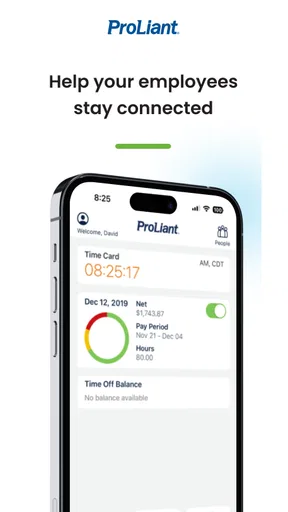
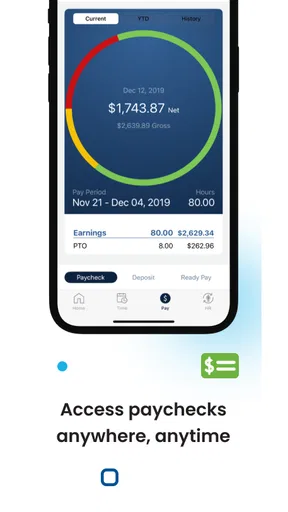
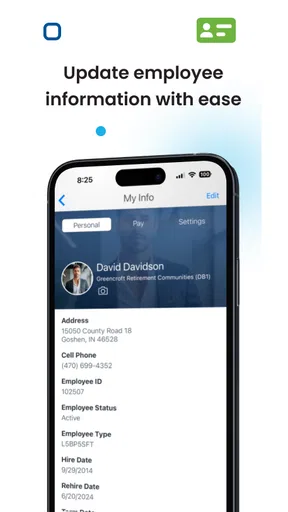
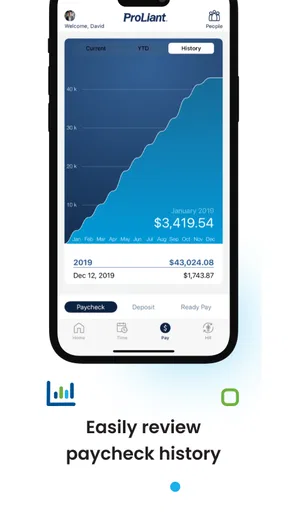
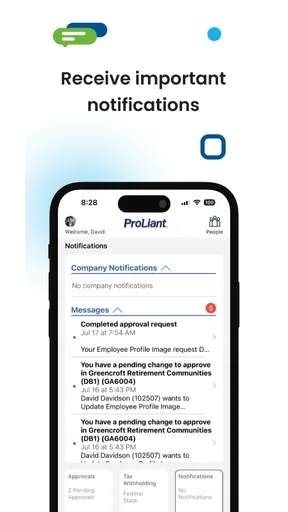
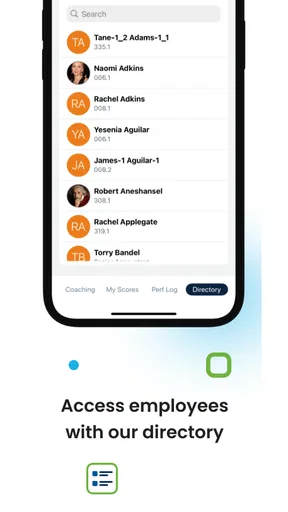
 Analysis by AppCompare
When an employee self-service tool is useful, it usually earns its place by removing small bits of workplace friction: checking a schedule, reviewing payroll information, or handling a routine request without calling a manager or opening a desktop portal. That is the role I found for ProLiant Mobile, a free business app from Proliant, Inc. It is designed for employees rather than customers, and that distinction matters from the first screen. This is not a general productivity app or a team chat platform; it is a mobile doorway into an organization’s Proliant employee services.
My overall impression is practical rather than exciting. The app can be genuinely convenient when your employer already uses Proliant and has enabled the relevant employee tools. At the same time, its usefulness depends heavily on that workplace setup. Someone looking for a standalone time tracker, payroll calculator, or task manager will not get much from installing it alone. I would recommend it to employees who want quicker access to work information, but I would not treat it as a replacement for every HR conversation or every desktop function.
How ProLiant Mobile feels in its current form
The application belongs to the business category and carries an Everyone content rating, which fits its purpose: it is a workplace utility, not an entertainment product. It has been available since May 27, 2015, and the current version is 3.6.9. That history suggests an established product rather than a newly launched experiment, but it also makes the current experience more important than the original release date. An employee today needs a tool that feels dependable during ordinary work moments, not a reminder of how long the app has existed.
In practical use, I would approach it as a companion to an employer’s existing Proliant system. The app’s value is strongest when I need a quick answer while away from a computer. A phone is already in my hand during a commute, a break, or the end of a shift, so a mobile employee portal can save the awkward step of waiting until I reach a desktop. That convenience is modest, but repeated small conveniences are exactly what make this kind of software worthwhile.
The audience is fairly specific. Hourly employees, people who work across locations, and staff who do not sit at a desk all day are likely to notice the benefit first. A manager may also appreciate having employee-service access available while moving around a workplace, although the experience should not be confused with a full management suite. For office workers who already have an always-open HR portal on their computer, the phone version may be useful mainly for quick checks rather than daily work.
The app has passed half a million installs and holds an average rating of 3.3 from roughly 900 ratings, with more than 350 written reviews. I read those figures as a sign of a functional but uneven experience rather than a universally loved one. A middling rating is not automatically a warning, because employee apps are often judged by company configuration, login rules, and individual expectations. Still, it tells me to recommend a trial run before depending on the app for an urgent payroll or scheduling question.
One important point is that installing it does not guarantee immediate usefulness. Your employer needs to use the Proliant platform, and your account needs to be recognized within that organization’s setup. If you download the app before receiving workplace instructions, you may spend time wondering whether a login problem is caused by your password, your employer’s configuration, or the app itself. I would first confirm the correct employee credentials and ask which mobile functions your organization supports.
Worth Reading Before You Choose

EA SPORTS FC Mobile 26 Is a Bigger Football Game, but It Takes Time

Flipboard Shows What News Apps Must Do Beyond the Feed

Switching to Android Auto Means Rethinking Your Driving Routine

Google Calendar Makes a Crowded Week Easier to Manage

Ludo King Makes the Most of the Minutes Between Plans

Baby Panda World Brings Quick Play to Modern Phones, but Its Game Library Feels Busy
What the version history tells me
The current version, 3.6.9, is the clearest verified marker of the app’s present state. It shows that Proliant, Inc has continued maintaining the mobile client beyond its original release. That is encouraging for an employee-facing tool, because payroll and workforce information are not areas where I want an abandoned application. However, a version number by itself does not prove that every screen has been redesigned or that every workplace workflow is equally polished.
I would separate that confirmed maintenance signal from expectations about future development. A maintained app may receive compatibility fixes, refinements, or organization-specific improvements without changing the parts that a particular employee uses. In other words, an update can help the foundation while leaving a frustrating navigation step untouched. I would watch future releases for clearer sign-in recovery, smoother movement between employee tasks, and better consistency across different employer configurations, but I would not promise those changes as current features.
The age of the product also changes how I judge it. A long-running employee portal has had time to become familiar to organizations, which can be an advantage when a company has already built its processes around it. Familiarity reduces the training burden: employees may only need to learn where the mobile entry point is. The trade-off is that older workplace systems sometimes retain desktop-era habits, and a phone interface can feel like an adaptation rather than a design created specifically around mobile behavior.
For an existing user, the best way to evaluate an update is not by the version label but by a few personal workflows. After installing the latest release, I would test the action I perform most often, then check a second task that involves moving between screens or returning after the app has been closed. I would also verify that the information shown on the phone matches what I see through the usual company channel. That small comparison can reveal whether the app is a convenient front end or merely an incomplete view of the larger system.
Where it can save time during a normal workday
Imagine finishing a shift and realizing you are unsure whether your recorded hours were entered correctly. With a mobile employee-service app, I can check from home rather than waiting for the next workday or asking a supervisor to look it up. If the information is available through the employer’s configuration, that is a better workflow than keeping a handwritten note and trying to reconcile it later. The real benefit is not sophisticated technology; it is having the relevant workplace information closer to the moment when the question occurs.
A similar situation applies to schedule awareness. Someone working changing shifts may want to check work information before leaving for the day, while traveling, or before arranging childcare. A mobile screen is especially helpful here because the employee may not have access to a company computer. I would still treat the app as a reference point rather than the only source of truth when a schedule has just changed. If a supervisor gives a last-minute instruction, direct confirmation remains safer than assuming the phone view has refreshed at exactly the right time.
There is also a useful habit for employees who want to reduce payroll surprises: check information periodically instead of waiting until payday. That gives me a chance to notice a possible discrepancy while the relevant shift or event is still easy to remember. The app does not replace the employer’s correction process, but it can help identify the issue earlier. This is one of the less obvious advantages of mobile access: it changes when I notice a problem, not only where I view the information.
Another practical tip is to use the app for quick verification and reserve complicated questions for a larger screen or a human contact. A phone is excellent for confirming a detail, but less comfortable for carefully reviewing a long record or composing a detailed explanation. Trying to force every HR task into a mobile workflow can create more frustration than it removes. I see ProLiant Mobile as the fast check-in point, not necessarily the complete workplace office.
How it compares with familiar alternatives
The usual alternative is a browser-based employee portal. A browser can offer a broader view and may be easier for reviewing several pieces of information at once. It is also more flexible when an employee is using a shared workstation or a personal computer. The advantage of the dedicated app is immediacy: I do not need to remember a portal address, locate a bookmark, or navigate through a company website before reaching the employee area.
Another alternative is contacting a supervisor or HR representative for every question. That approach remains necessary for exceptions, corrections, and policy explanations, but it is inefficient for routine lookups. ProLiant Mobile can reduce those interruptions when the information is already available in the employer’s system. The important trade-off is that self-service only works for information the organization has exposed through the mobile experience. It cannot interpret a policy or settle a disagreement on its own.
Compared with a general calendar, notes app, or standalone time tracker, this app has a different strength. Those tools may be better for personal planning because I control their contents, but they do not provide the employer’s official records. Copying work details into a personal app can also create duplicate information that becomes outdated. I would use a personal calendar to remember a shift or appointment, while using the employee portal to verify the underlying workplace information.
For companies considering a broader workforce platform, the question is not whether this app looks better than every competing product. The more useful question is whether employees already depend on Proliant and need mobile access to that existing environment. If the organization uses another HR system, this app is unlikely to add value. If Proliant is already central to payroll or employee administration, a familiar mobile companion may be simpler than introducing a separate tool just for phone access.
Small workflow lessons that matter
My first recommendation is to identify the one task you need most before judging the whole app. Employee portals can contain many sections, but a person may only care about schedule checks, payroll details, or another routine service. Testing that task first prevents a common mistake: dismissing the app because an unrelated area is not relevant to your role. It also gives you a clear standard for deciding whether the mobile version is worth keeping installed.
Second, keep your login expectations realistic. A workplace app is tied to an employer account, so a successful installation is not the same as successful access. If sign-in fails, I would avoid repeatedly guessing credentials. I would check the organization’s onboarding instructions and contact the appropriate workplace administrator instead. This is a simple distinction, but it prevents employees from treating an account-configuration issue as proof that the entire app is broken.
Third, compare mobile information with the source you already trust during the first few uses. I would check one familiar record through the normal company method and then look at the corresponding mobile view. This is particularly sensible before relying on the app for a time-sensitive decision. The comparison is not about distrusting the software; it is about learning how quickly the employer’s information appears on each channel and understanding which route is best for urgent questions.
Finally, think about privacy in ordinary, practical terms. A phone used for work information should be protected with the device’s normal security controls, especially if other people occasionally handle it. I would avoid leaving the app open on a shared device and would be careful when checking workplace details in public. These are not reasons to avoid the app; they are sensible habits for any mobile tool connected to personal employment information.
Where the experience may still feel limited
The biggest limitation is dependency. ProLiant Mobile cannot be judged in isolation because the organization controls much of what an employee can do with it. Two people may install the same application and encounter different practical value because their employers enable different services or maintain different records. That makes the app less predictable than a personal utility, and it explains why one employee may find it indispensable while another sees little reason to use it.
The second limitation is the gap between quick access and complete support. A mobile employee portal can show information, but it is not automatically a substitute for a conversation when something is wrong. If a record needs correction, a policy needs interpretation, or a manager needs to approve an exception, I still need the workplace process. Users who expect the app to resolve every payroll or scheduling concern without human involvement may come away disappointed.
There is also a comfort issue. Phones are convenient, but they are not always the best place to inspect detailed employment information. Small screens encourage quick scanning, and that can make it easier to overlook context. For a simple confirmation, the format is suitable. For careful review, I would prefer a browser or another larger display, particularly if I need to compare several entries or document a discrepancy.
The average rating of 3.3 also makes me cautious about calling the experience universally smooth. I would not use that number as a verdict on every installation, because employer configuration and account support can influence how people rate an employee app. Still, prospective users should expect some friction and allow time to learn the organization’s particular setup. The app is more compelling when it removes a repeated inconvenience than when someone installs it without a clear workplace need.
Who should use it and who should skip it
I think ProLiant Mobile is a sensible choice for employees whose organization already runs Proliant services and who regularly need work information away from a desktop. It is especially suitable for people with changing schedules, mobile jobs, or limited access to a workstation during the day. For them, the ability to check an official workplace record at the moment a question arises can be more valuable than a polished collection of extra features.
I would be more reserved if you only need a personal calendar, a basic time log, or a way to message coworkers. Those needs are better served by tools designed for personal planning or communication. I would also skip the app if your employer does not use Proliant, because the installation alone cannot create an employee account or connect you to a different HR system.
Managers and administrators should judge it from another angle. The app may help them stay connected to employee-service information while away from a desk, but it should not be assumed to replace the organization’s full administrative workflow. Before encouraging a whole team to rely on it, I would test the most important employee journeys, confirm how support is handled, and make sure staff know which issues still require HR or management assistance.
What I would watch in future updates
With the current version at 3.6.9, I would watch for improvements that make everyday actions more direct rather than simply adding more destinations. Clearer navigation, dependable return points, and a consistent experience after reopening the app would matter more to me than a crowded feature list. Employee software succeeds when a person can complete a routine task without having to remember how the system is organized.
I would also look for stronger separation between what the app can display and what it can help an employee resolve. Good guidance around corrections, support contacts, or next steps would make a mobile record more useful when something looks wrong. That kind of clarity would reduce the temptation to repeatedly refresh a screen or assume that a missing detail is a personal login problem.
Future maintenance should also preserve trust. Because this app handles workplace information, employees need confidence that the mobile view is current enough for ordinary decisions and that updates do not make familiar tasks harder. I can reasonably expect continued attention from a product that has reached version 3.6.9, but I would evaluate each release through actual work routines rather than assuming a higher number means a radically different experience.
My final recommendation is straightforward: install ProLiant Mobile if your employer uses Proliant and you have a recurring reason to check employee information from your phone. It is free, available to an Everyone audience, and its long-running presence gives it a credible place in a company’s mobile workflow. Just keep its role clear. In my experience, it works best as a convenient self-service window for routine checks, while detailed reviews, corrections, and unusual situations still belong to the employer’s broader HR process.
Pros
- Quick access to server health and hardware status on the go.
- Useful alerts help administrators notice potential issues sooner.
- Supports remote monitoring without needing a full desktop interface.
- Clear hardware information makes routine checks easier.
- Convenient companion for IT teams managing HPE ProLiant servers.
Cons
- Requires compatible HPE ProLiant hardware to be useful.
- Some features may depend on server configuration and network access.
- Remote access can be limited by firewalls or security policies.
- Not designed for managing non-HPE server environments.
- Advanced troubleshooting may still require HPE management tools.
FAQs for ProLiant Mobile
What is ProLiant Mobile used for?
ProLiant Mobile is designed to help users monitor and manage compatible HPE ProLiant server environments from a mobile device. Depending on the supported version and connected infrastructure, it may provide access to server status, hardware information, alerts, and basic management functions. It is mainly intended for IT administrators and technical teams rather than casual users, so its usefulness depends on having compatible HPE equipment and the required network access.
Which devices and operating systems are compatible with ProLiant Mobile?
Compatibility can vary according to the application version, device model, and HPE server management technology being used. Before downloading, users should check the current requirements on the official Android or iOS store and confirm that their phone or tablet is supported. It is also important to verify whether the app requires a particular HPE management platform, firmware version, browser capability, or operating-system release to work correctly.
Does ProLiant Mobile work without an HPE ProLiant server or an internet connection?
ProLiant Mobile is not generally useful as a standalone application because its main purpose is to connect with compatible HPE ProLiant infrastructure. In most setups, the device needs network access to the relevant server or management service, and remote access may require a properly configured VPN or secure gateway. Some features may be unavailable offline, so users should not expect full monitoring or administration without connectivity.
Is ProLiant Mobile safe for managing servers remotely?
The app can be useful for remote server supervision, but security depends heavily on how the surrounding environment is configured. Users should connect only through trusted networks, use strong administrator credentials, keep the app and server firmware updated, and enable secure access methods such as VPN or encrypted management connections where available. Because the app may expose sensitive infrastructure information, it should be installed only from an official store and used by authorized personnel.
Is ProLiant Mobile free, and are there any additional requirements?
The application may be available to download without a separate purchase, but access to its practical features can depend on the HPE hardware, management software, licenses, credentials, and network configuration already in place. Organizations may also need administrator permissions or specific server services enabled before the app can display useful information. Checking the official listing and HPE documentation is recommended, since availability and requirements can change between versions.


